Release notes
26.01.2026
We are introducing newer models for our Business Agent with the modules for GPT 4.1, GPT 4.1 Mini and 04 mini. This is due to the retirement of the older modules that needs to be updated.
Workspace changes, member interface updates and more....
Index receives easier switch between Index and Agent, as well as an improved user experience
Index & Agent
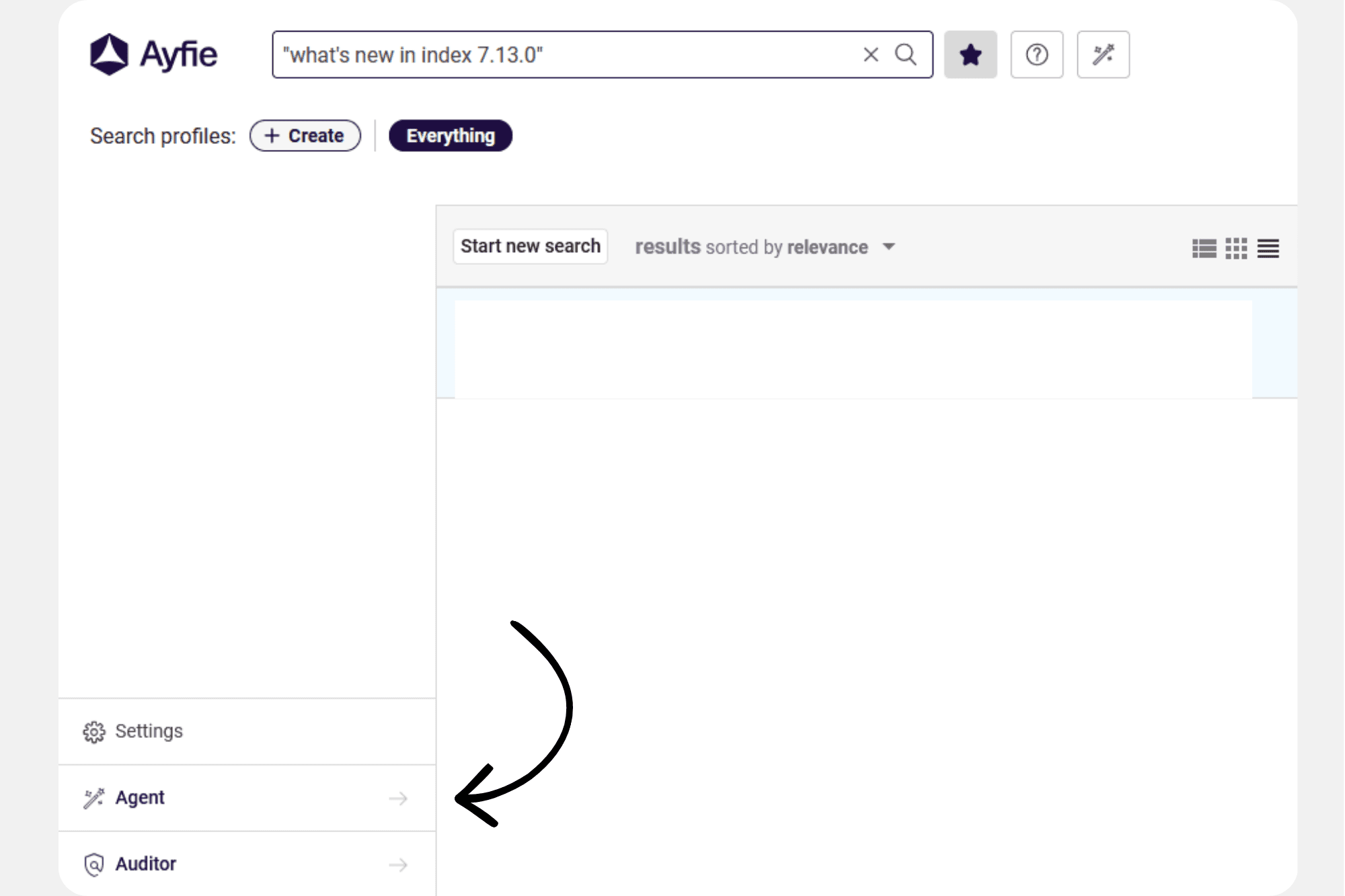
Index 7.13.0 introduces navigation buttons in the left menu across all applications, allowing users to easily navigate between the Search, Agent, and Auditor applications.
Updated System LLM Models
Index 7.13.0 comes with a new set of system models for Agent. The current system models will be retired by Microsoft on 31 March 2026. Administrators must update the system models in Agent before this date to ensure continued operation. See the “Update Existing Deployment” section of the Agent - System Models Configuration | Update Existing Deployment guide for instructions.
The new system models use the following:
GPT-4.1 (default)
GPT-4.1 mini
o4 mini
Before deploying the new system models, administrators should validate their Azure subscription quotas to ensure sufficient capacity for the updated models. See the "Prerequisites" section of the Agent - System Models Configuration | Prerequisites guide for detailed quota verification instructions.
Enhanced Shared Workspace Administration
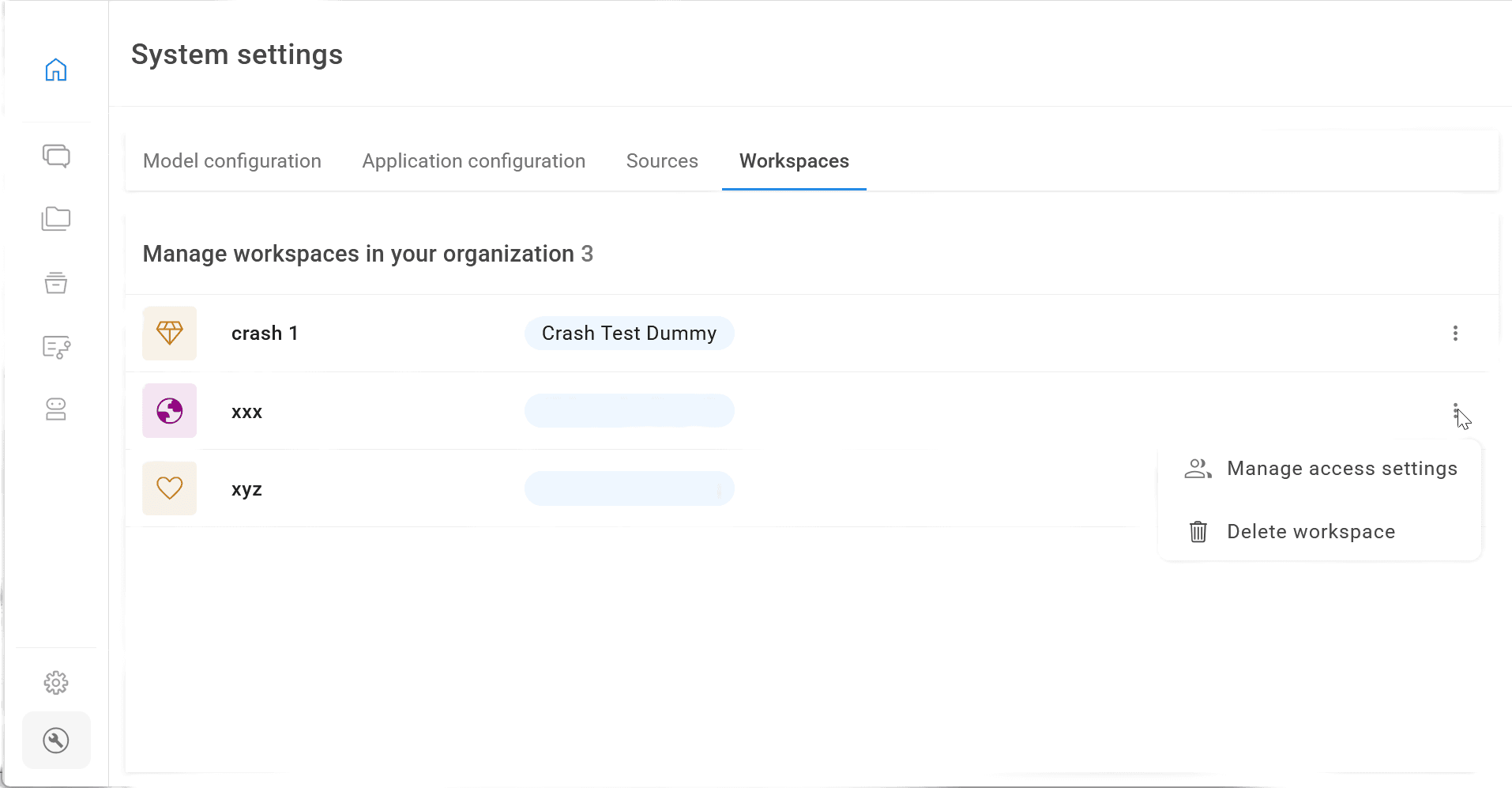
Administrators can now manage access settings for all shared workspaces via System Settings, enabling centralized control over collaboration permissions and security across the organization.
Improved Workspace Organization
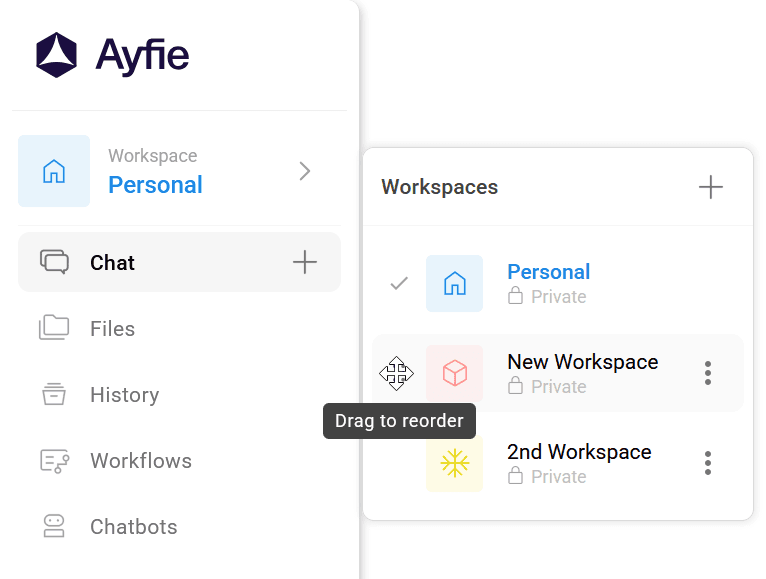
The workspace list now features drag-and-drop reordering, visible permissions, enhanced action menus, confirmation dialogs for critical actions, and hover descriptions for improved organization and usability.
Bug Fixes
Resolved workspace permission and access issues, including editing restrictions for non-owner users and workspace loading problems
Improved error handling with fixed file deletion loading indicators and WebSocket connection loss notifications
Enhanced security authorization in multi-tenant environments to prevent unauthorized access
Improved system diagnostics with better WebSocket disconnection logging and model configuration handling
24.02.2026
We're excited to announce the latest updates to Ayfie's platform! This release brings necessary workspace enhancements, smarter source handling, improved AI model support, and a host of quality-of-life improvements across both Index 7.14 and Business Agent 3.16.
Index & Business Agent
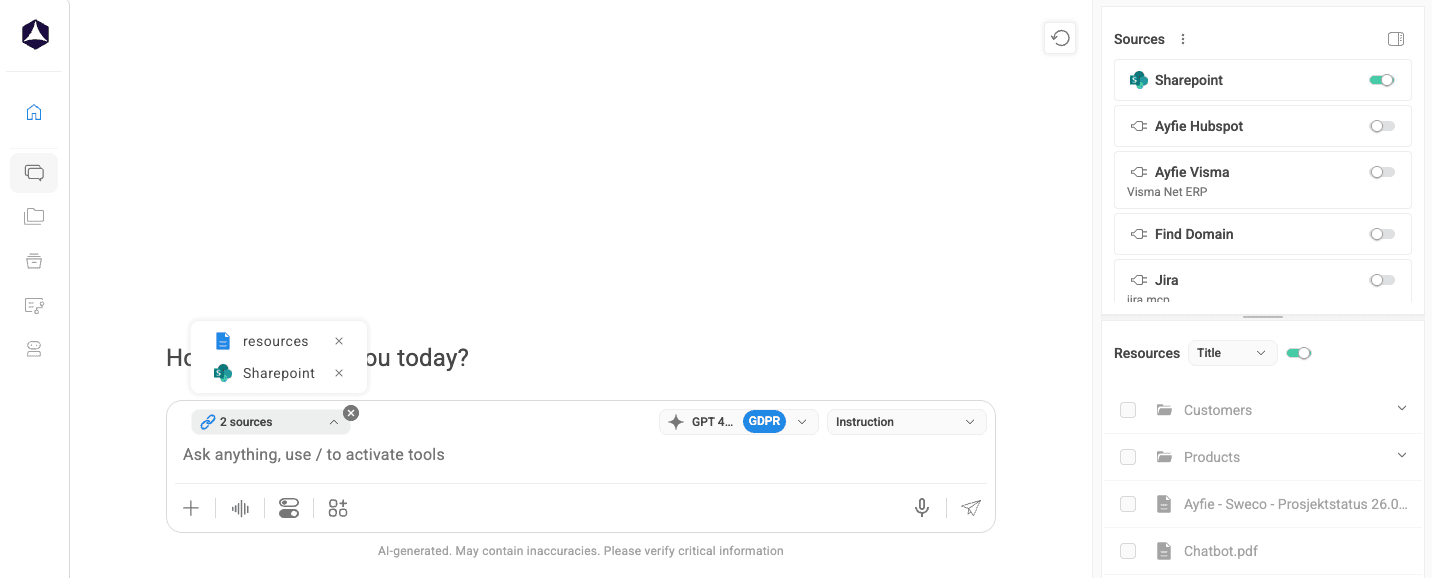
Index 7.14.0 & Business Agent 3.16 now comes with URL based search and a unified personal and uploaded-file sources into a consistent step-based flow so users can combine them with MCP/Web/Index more easily.
Source Management
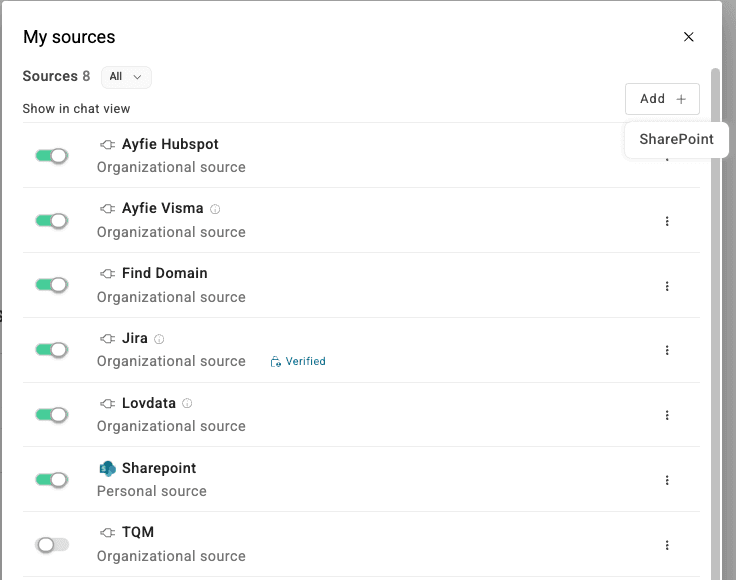
We have also made adjustments and changes to how to add and organize your sources to make it easier for the user to personalize their setup when there are a lot of different sources.
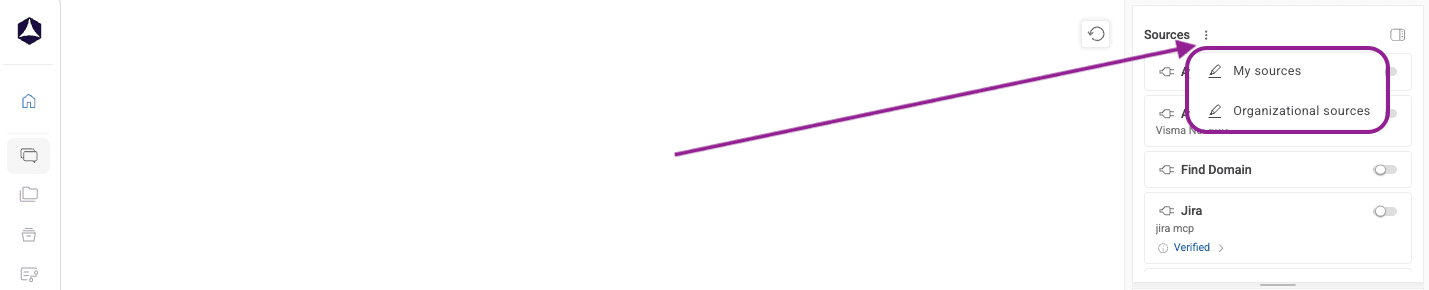
In the main window, you can now find a 3-dotted menu next to sources where you can find My Sources & Organizational Sources.
Under My Sources, you can also add Sharepoint as a Source, as long as it is supported for your environment.
Chat Functionality
Expanded Mistral Support — Mistral model now supports tool calls with reliable handling across MCP, Web, and Index sources.
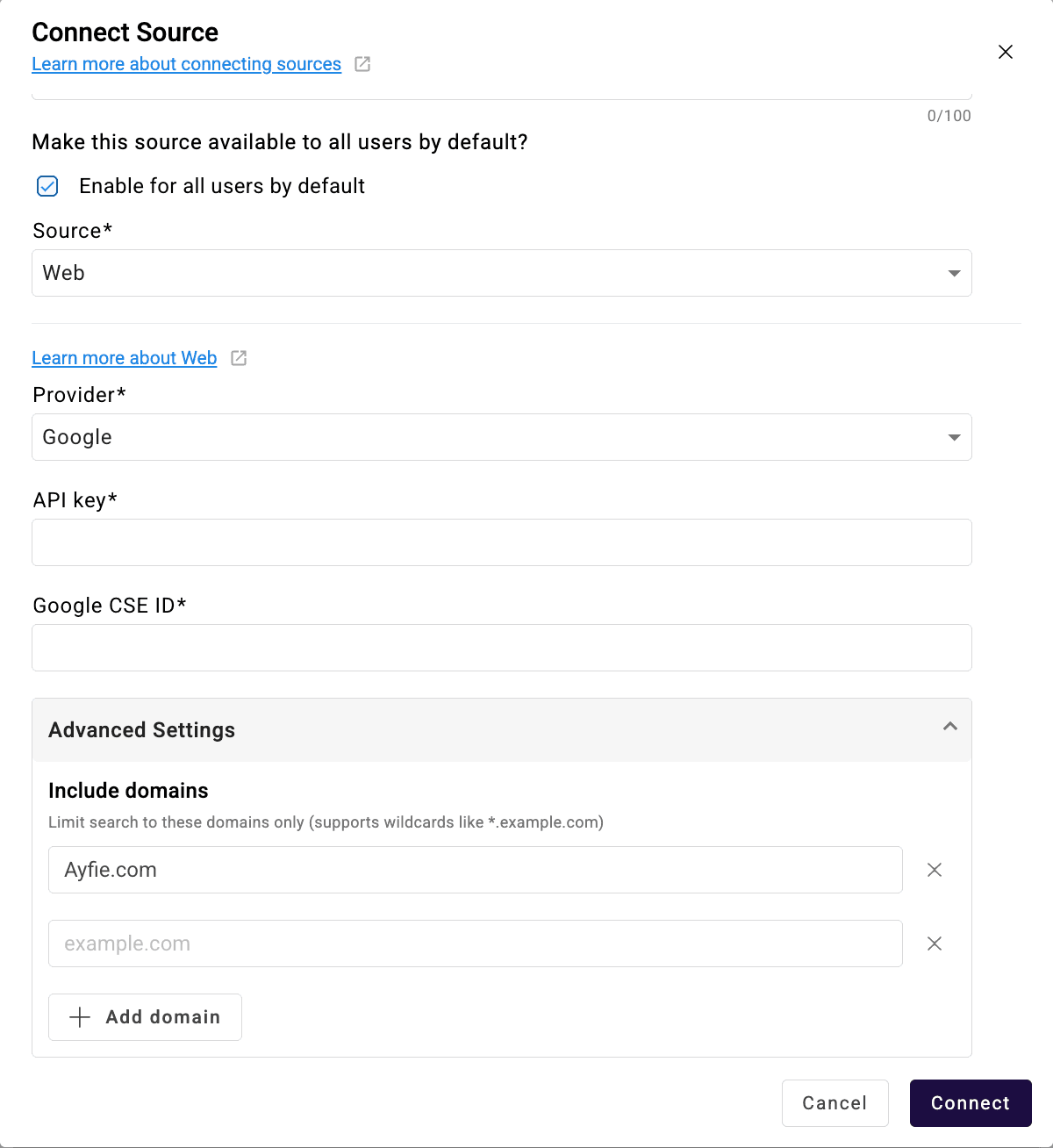
Smarter WebSearch — Users can now provide URLs directly in prompts and restrict web searches to specific domains for more relevant results.
Improved Google Web Scraping — Enhanced web page scraping when using Google as the WebSearch provider.
Unified Source Handling — Chatting with personal sources and uploaded files now follows a consistent step-based approach, allowing seamless combination with MCP, Web, and Index sources.
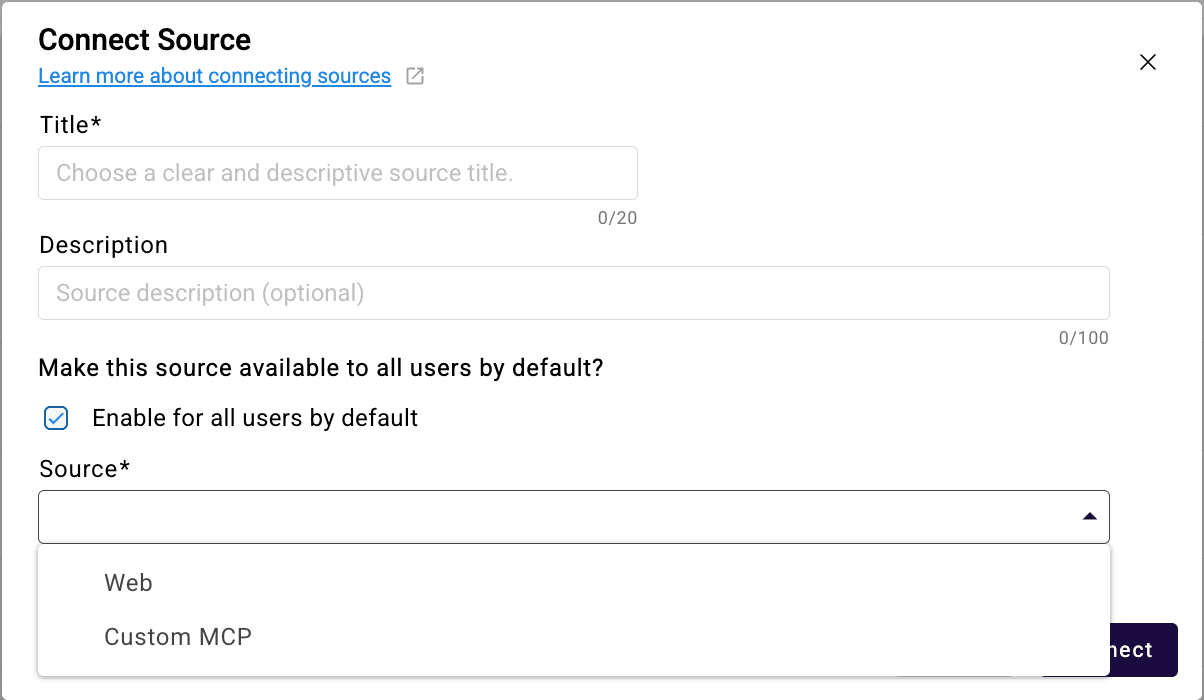
URL Based Source — Admins can now also setup specific URL's as a source (MCP) for their organization to allow for web without granting complete access and limiting the knowledge feedback that the model can work with.
Enhanced Shared Workspace Administration
Administrators can now manage access settings for all shared workspaces via System Settings, enabling centralized control over collaboration permissions and security across the organization.
Workspaces
Workspace-Level Sources — Members can use shared sources within workspaces; privileged users can configure new sources and manage organizational visibility.
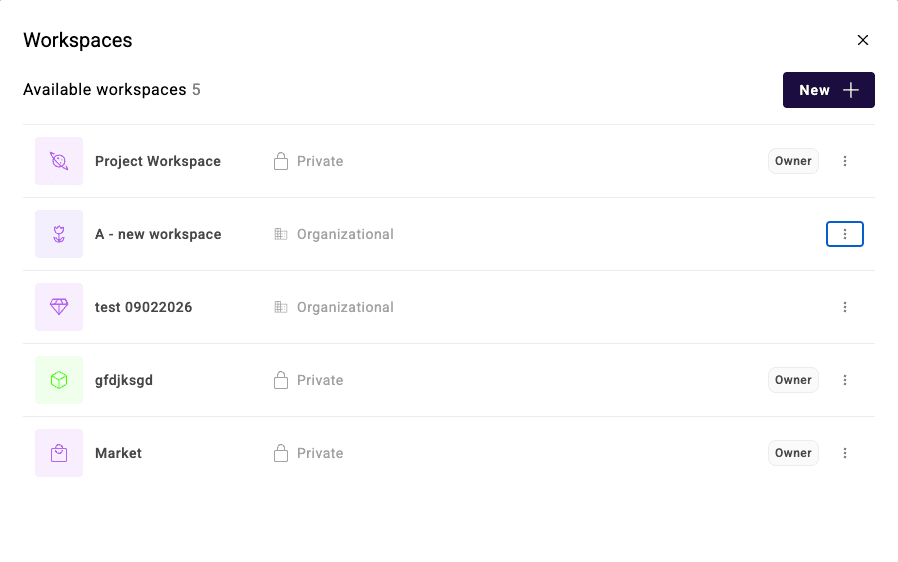
Refreshed Workspace UX — Updated workspace wizard, clearer admin lists with type/owner indicators, and new three-dot menu actions (Manage, Delete, Hide).
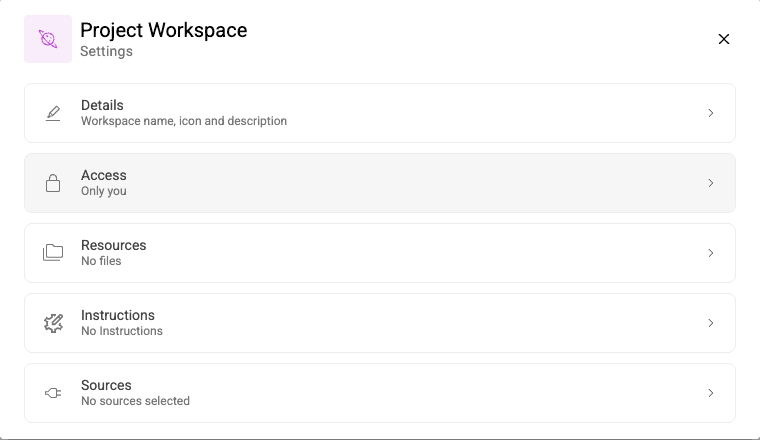
Improved Admin View — Condensed owner info with tooltips, workspace type indicators, description tooltips, and total workspace count in the header.
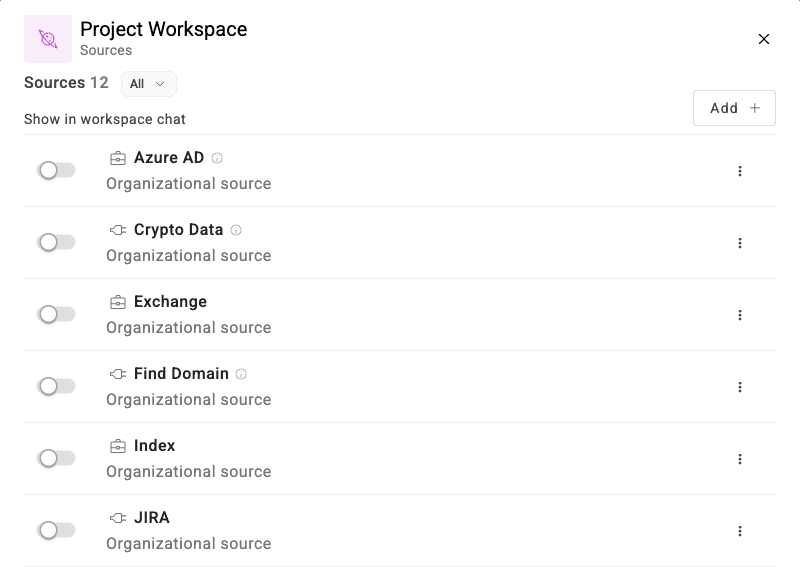
Cleaner Sources Settings — All source options moved to a three-dot menu, new workspace list labels, default source enabling during setup, and an "Activate all" toggle for tool selection.
Administration
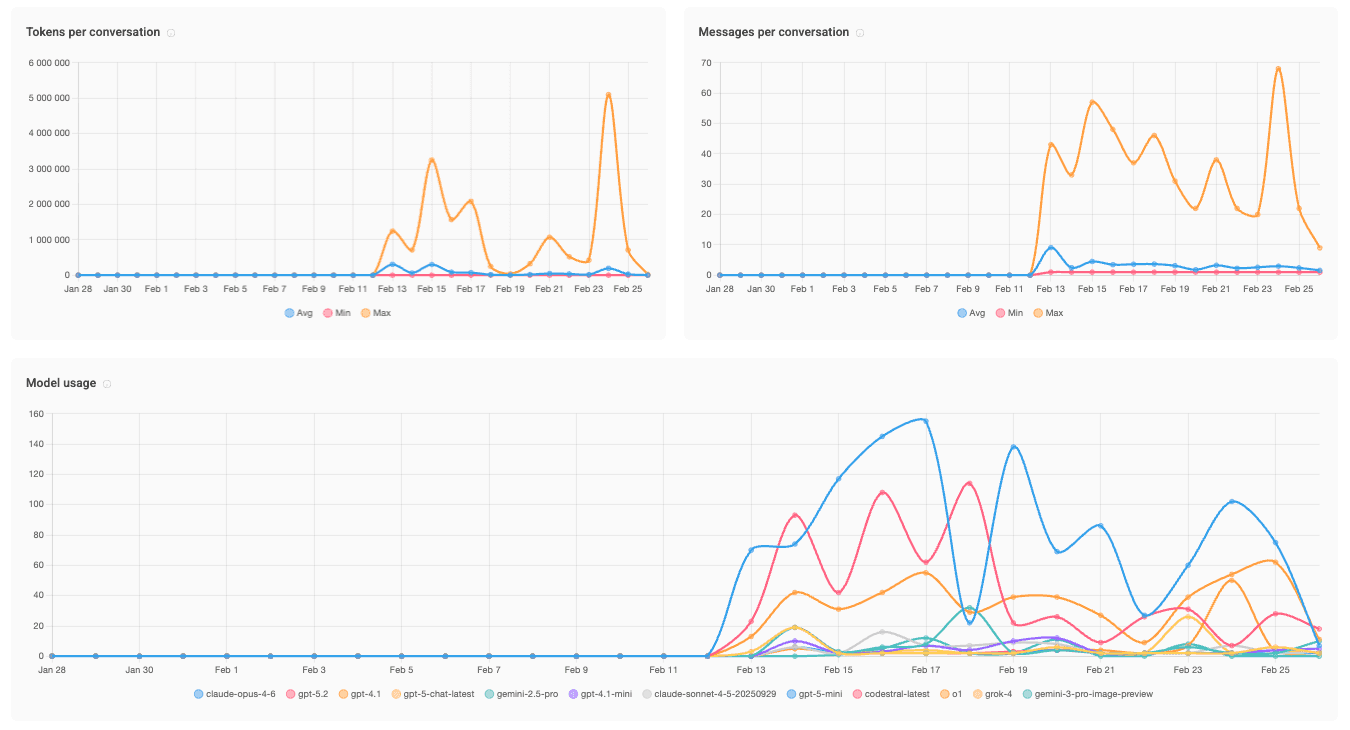
Application Usage Statistics
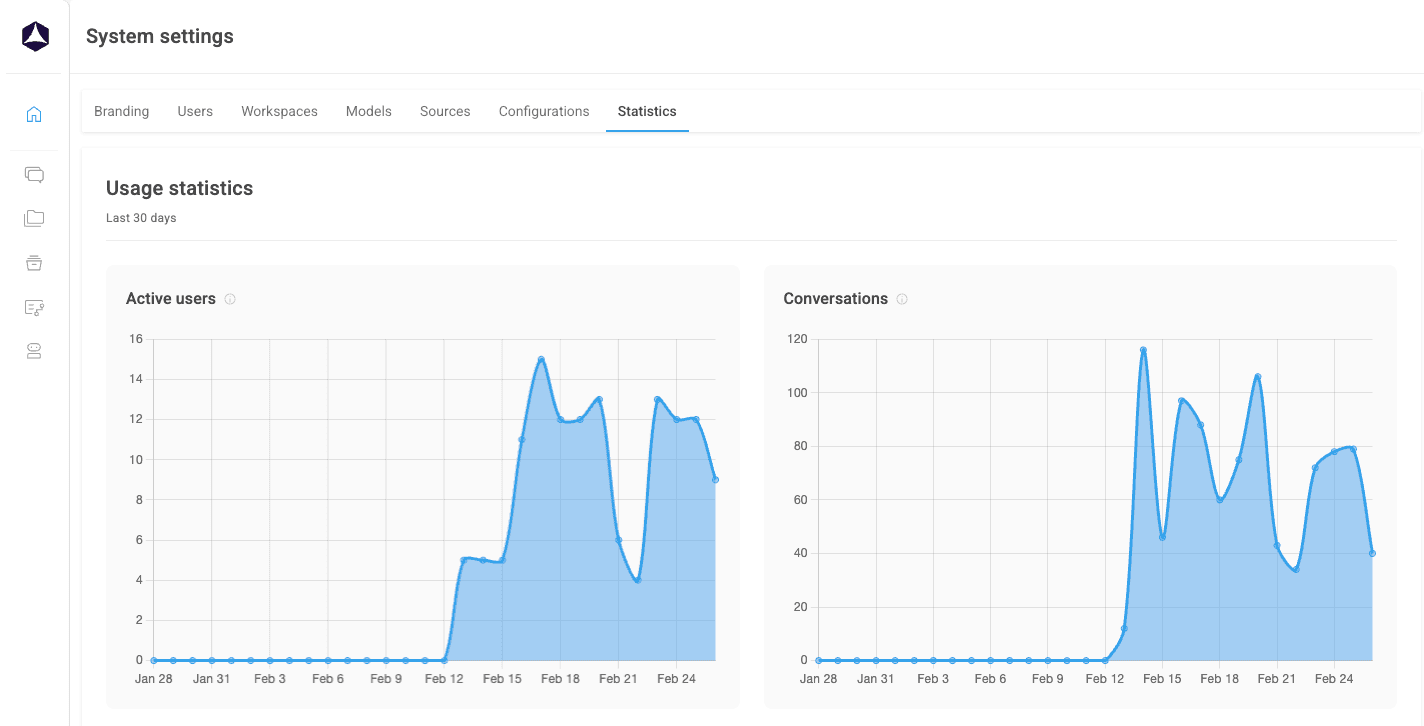
New statistics dashboard added under System Settings.
Here you are able to view your general user statistics and see finer details on the following:
Active Users
Amount of total Conversations
Tokens Per Conversation
Messages Per Conversation
Model Usage (LLMs) to figure out which is the most preferred by your users
Uploaded files and the size of them
Multi-Tenant Permissions
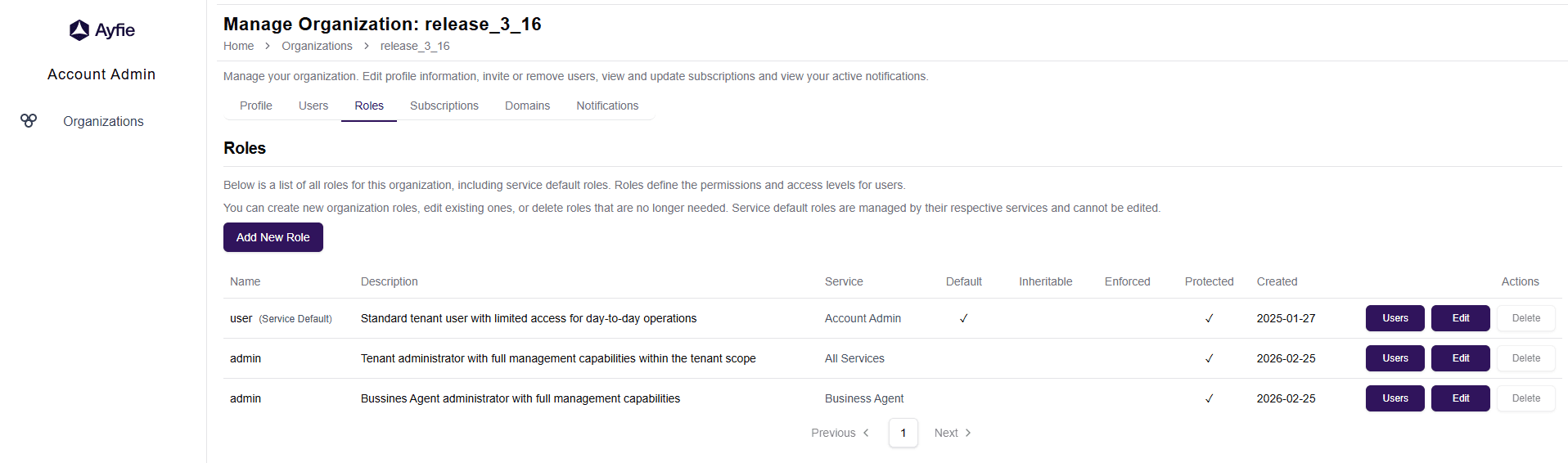
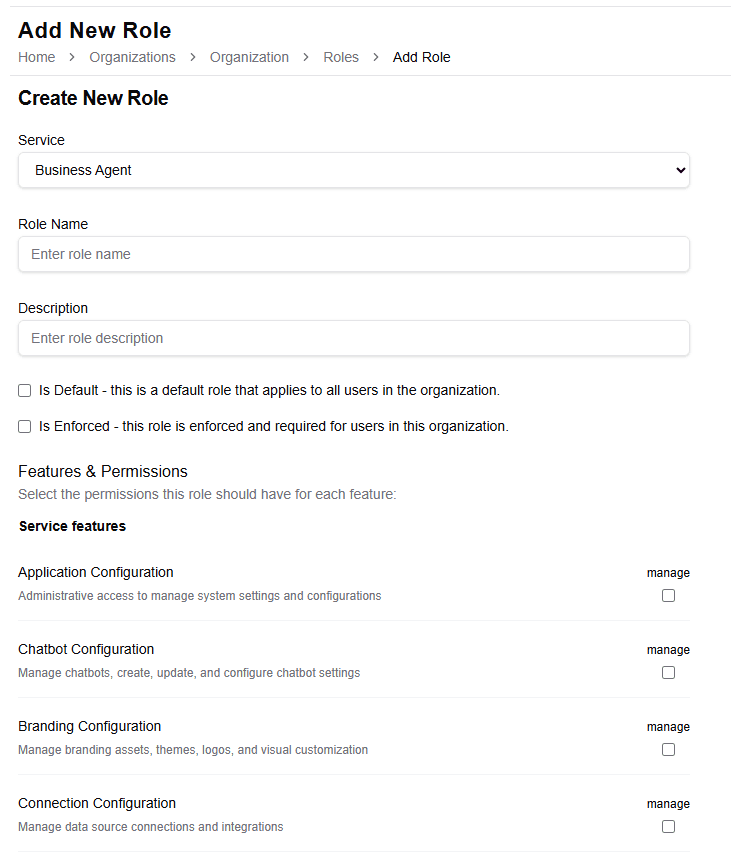
Integrated a multi-tenant permissions system to strengthen governance and tenant separation.
You can read more about the details on how to set up your roles and administration here: Administration of Roles.
Temporary Disabled Image Function
Due to limitations from the provider of our current default Image generation model, we are forced to temporarily disable the model as it meets its end of life early in March.
To avoid this and since we currently have no alternative to offer in the default model that we can setup on your behalf, it will no longer function for the time being. We are working hard to look into how this can be resolved for future releases.
However, it is possible to setup your own model for image generation through the Azure Marketplace! Here you have a wider variety of models which you can apply for and insert into the Ayfie Business Agent.
Below you will find a guide on how to perform this.
Installation of a different image generation model
Requirements:
Admin Access to Azure Marketplace
System Admin access in Ayfie Business Agent
Applied and confirmed access to 1/3 total options of image generation models supported through this form: https://aka.ms/oai/gptimage1access
Guidance:
Gather template for wanted model here: Model Configuration Template
Information about models: Available Models
Install using guide from here: Custom Image Model Config
Bug Fixes
Fixed an issue preventing internal chatbots from connecting to multi-chatbots.
"Reset Chat" button now properly clears the chat and makes the input field available.
Corrected an incorrect warning message when removing a user from a workspace.
Added a clear error message when a user attempts to chat in a workspace they no longer have access to.
Fixed scheduled cleanup tasks for corporate deployments.
Resolved a bug where deleting a user account did not fully remove all associated data.
Fixed inline image processing when chatting with sources (Web, Index, MCP, or uploaded files).
Adjusted navigation button dividers to match the design specification.
20.03.2026
We're excited to share the latest updates to the Ayfie platform. This release focuses on giving you more control over how your documents are processed, bringing workflows into your workspaces, making chatbot creation faster and more intuitive, and refreshing the AI models available across the platform. Whether you're building chatbots, organizing team workspaces, or working with large document sets, Index 7.16 and Business Agent 3.17 deliver meaningful improvements you'll feel right away.
Index & Business Agent
Index 7.16.0 & Business Agent 3.17 has now gotten improved Chatbot setup and the newly introduced different chunking strategies for the various documents that you upload into the chatbot. We will also introduce this in the overall upload of all documents later. You can see the quick introduction video below.
This is the headline feature of Agent 3.17, and it's one we're particularly excited about. You now have five distinct chunking strategies to choose from when uploading and processing documents. This means you can tailor how the AI reads and understands your files based on the type of content you're working with.
Strategy | How It Works | Best For |
|---|---|---|
Standard (Sentence Boundary) | Splits text into chunks of approximately 800 characters while preserving full sentences. | Most documents, mixed file types, and first-time users. Fast, cost-effective, and reliable across all file types. |
Overlap Chunking | Splits text into fixed-size chunks with overlapping sections between them, so context isn't lost at chunk boundaries. | Long, continuous documents where details span across sections. Keeps context intact at the cost of slightly higher processing. |
By Document Structure | Splits documents based on their natural structure — headings, paragraphs, sections, and lists. | Reports, contracts, manuals, and any document with clear structural formatting. Keeps related content together within logical units. |
Semantic Chunking | Groups sentences together based on meaning. When the topic shifts, a new chunk begins. | Documents where ideas flow across paragraphs and you need the AI to understand thematic boundaries rather than structural ones. |
Whole Document (No Chunking) | Treats the entire file as a single chunk — no splitting at all. | Short documents where full context matters and you want the AI to consider the entire file at once. |
Why this matters to you: Different documents benefit from different processing approaches. A legal contract with clear section headings works best with document structure chunking. A long research paper with flowing arguments benefits from semantic chunking. Now you have the flexibility to match the processing method to your content — and get better, more relevant answers as a result.
Where you'll find it: When uploading files — whether in your personal workspace, a shared workspace, or when building a chatbot — you'll be prompted to select a processing method. You can also update the processing method for individual files after upload.
Easier setup of Chatbots
Building a chatbot just got faster. We've reduced the number of steps in the chatbot creation wizard and reorganized the setup flow so you can get to a working chatbot more quickly.
Here's what changed:
Fewer steps — Settings that were previously spread across later steps have been consolidated upfront, so you configure the essentials early.
"Title" field — The chatbot name field is now called Title for clarity and consistency.
Preview and Save as Draft — Two new buttons in the wizard's top bar. Preview lets you test your chatbot with current settings without losing your progress. Save as Draft lets you save your work and come back later — no need to complete every step in one sitting.
Processing method selection — When you upload files to your chatbot's knowledge base, you'll now be asked to choose a file processing method (see the chunking strategies above). This gives you control over how your chatbot's knowledge is prepared.
Why this matters to you: Whether you're creating your first chatbot or your tenth, the streamlined wizard means less clicking and more building. The draft and preview features are especially useful when you're iterating on a chatbot's setup and want to test as you go.
Personal Source Management in Workspaces
All workspace members can now toggle the visibility of sources within their workspace view. This is a personal preference — hiding a source for yourself doesn't affect what other members see.
The sources menu in workspaces has also been refined:
As a regular member, you'll see your workspace sources where you can show or hide sources for your own view.
As a workspace owner or admin, you'll also see workspace-level source management for controlling which sources are available to the workspace overall.
In the main window, you can now find a 3-dotted menu next to sources where you can find My Sources & Organizational Sources.
Workflows available in Workspaces
Workflows are no longer limited to your personal space. You can now create, run, edit, and manage workflows directly inside any workspace. This means your team can share repeatable, step-by-step AI processes within the same collaborative environment where you're already chatting and sharing files.
A few things to know:
Workflows in workspaces are context-aware — they're stored and managed separately from your personal workflows, so there's no overlap or confusion.
All workflow actions — create, edit, run, and delete — work the same way you're used to, just now within the workspace context.
Why this matters to you: If your team has standardized processes — document review steps, report generation templates, onboarding checklists — you can now build those as workflows and make them available to everyone in the workspace. Less repetition, more consistency.
Updated AI Models
We're refreshing the AI models available in Ayfie to bring you better performance, newer capabilities, and continued GDPR compliance where it matters most.
New Default Models Now Available
Model | Notes |
|---|---|
GPT 5.1 | Replaces GPT 4.1 |
GPT 5 mini | Replaces GPT 4.1 mini |
GPT 5.4 | Replaces GPT 5.2 |
Claude Sonnet 4.6 | Replaces Claude Sonnet 4.5 |
Models Being Retired
The following models are being phased out and will be removed or replaced:
Retiring Model | Replaced By |
|---|---|
GPT 4.1 | GPT 5.1 |
GPT 4.1 mini | GPT 5 mini |
Claude Sonnet 4.5 | Claude Sonnet 4.6 |
Grok | (Removed) |
Why this matters to you: The new model lineup gives you access to the latest generation of AI capabilities — faster responses, better reasoning, and improved accuracy. The progressive rollout of GPT 5 mini as the replacement for GPT 4.1 mini means you'll see this transition happen gradually, giving you time to adjust.
Index 7.16 Updates – Connector Maintenance
Connector Broker Update (7.1.1)
Index 7.16 includes an update to the Connector Broker from version 7.1.0 to 7.1.1. This is a targeted maintenance update that fixes an issue with connector auto-upgrade, ensuring that connectors upgrade reliably without manual intervention.
However, due to Microsoft's retirement of Azure Access Control Service (ACS), all SharePoint connector configurations must move from Entra ID client secrets to a password-protected SSL certificate (.pfx). Please complete this change as soon as possible to ensure your SharePoint-based integrations continue to work without interruption.
For step-by-step guidance, see: SharePoint Connector – Changing from Azure ACS to Certificate-Based Authentication.
If you need assistance, feel free to contact us at support-nordic@ayfie.com.
Bug Fixes
This release also addresses several issues that improve stability and reliability across the platform:
Chatbot processing stability — Fixed an issue where files uploaded to a chatbot could remain stuck in a "processing" state indefinitely. This was caused by a race condition when multiple files were being processed simultaneously.
Image file uploads — Resolved an error that prevented users from chatting with uploaded image files when using the Ayfie text extractor.
Image generation model cleanup — For on-premises deployments migrating from a previous version, the retired DALL·E image generation model is now properly removed from system settings. To enable image generation, administrators can configure a custom model manually.
Application permissions — Fixed an issue where certain application-level permissions were incorrectly granting access to Workspaces, Users, or Sources settings.
Security improvements — Addressed security vulnerabilities identified during the release cycle.
Need help? Reach out to our support team or visit the Help Center.
Have feedback? Let us know what's working and what could be better. Your input directly shapes what we build next.
Happy exploring! 🚀
Made in Norway. Private by design.